# Development
Contributions are welcome! Please create an issue to discuss significant work before starting.
Canonical URL: https://docs.polyhammer.com/blender-addons/character-dna/0.15.1/contributing/development
Product: character-dna
Version: 0.15.1
Channel: production
Updated: 2026-11-21T13:45:20Z
Documentation source: initial main snapshot approved 2026-11-21T13:45:20Z
Documentation commit: 3533cd1260a9bd4b2806aaa4c64ead70766a1674
Release tag commit: 71125e9857db2b5a8ffa9426cc1f769d13017fd5
Owner-approved migration baseline: use current main documentation for the current stable release once; all subsequent releases use their tag snapshots.
Contributions are welcome! Please create an issue to discuss significant work before starting.
## Pull Request Process [#pull-request-process]
1. Fork the repository and create a branch matching the issue name.
2. Add the feature/fix with accompanying unit tests.
3. Run tests and ensure all pass.
4. Submit PR to `dev` with updated documentation.
New features require accompanying unit tests to be approved.
## Prerequisites [#prerequisites]
- [VS Code](https://code.visualstudio.com/download) (recommended for pre-configured profiles)
- [Python 3.13](https://www.python.org/downloads/release/python-31314/)
- [uv](https://docs.astral.sh/uv/getting-started/installation/) (Python package manager)
- [Git](https://git-scm.com/download/win) with Git LFS
- [Blender 5.2+](https://www.blender.org/download/)
## Setup [#setup]
### Using UV (Recommended) [#using-uv-recommended]
```bash
# pip install uv (if not installed) however system wide install is more ideal. (See instal link above)
pip install uv
# Create venv and install dependencies
uv sync
# Install pre-commit hooks
uv run pre-commit install
```
### Using VS Code [#using-vs-code]
1. Open the workspace - VS Code will prompt to install recommended extensions from `.vscode/extensions.json`
2. Copy `.env.example` to `.env`
3. Restart VS Code
4. Run `> Python: Select Interpreter` and choose `.venv/Scripts/python.exe`
## Build Tasks [#build-tasks]
Launch Blender/Unreal through VS Code build tasks (`CTRL+SHIFT+B`) to enable dev dependencies and debugging.
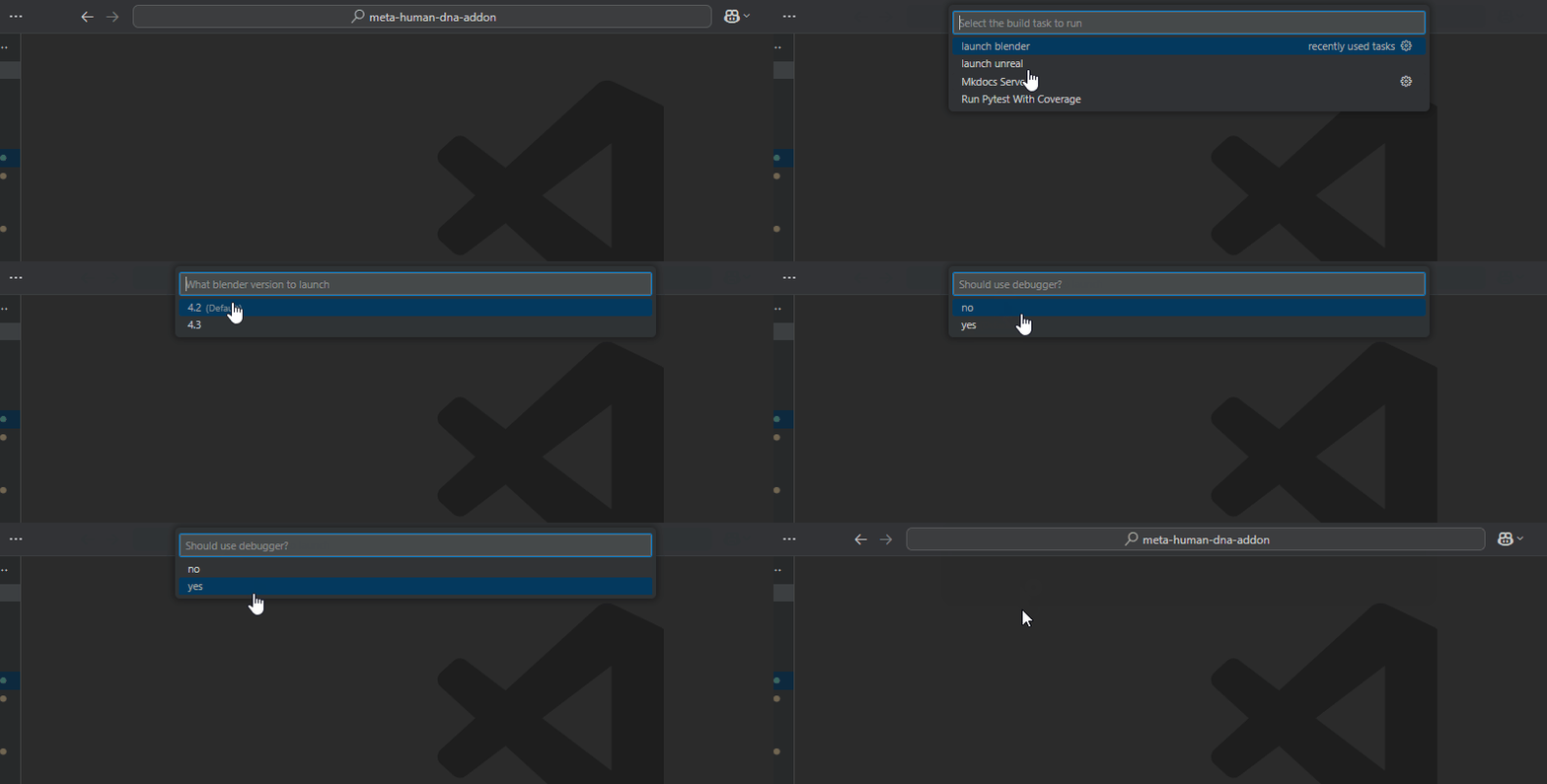
Selecting "debug" will hang the app until you attach via debugpy in VS Code.
Override executable paths via `.env`: `UNREAL_EXE_PATH`, `UNREAL_PROJECT`, `BLENDER_EXE_PATH`
## Launch Actions [#launch-actions]
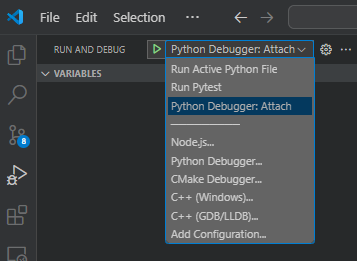
Use `Python Debugger: Attach` to connect to Blender after launching from build tasks.
## Reloading Addon Code [#reloading-addon-code]
**Blender** (when launched from VS Code):
```python
from poly_hammer_utils.helpers import reload_addon_source_code
reload_addon_source_code(['character_dna'])
```
## Code Quality [#code-quality]
All code is checked via pre-commit hooks and CI:
- **Ruff**: Linting and formatting (configured in `pyproject.toml`)
- **CSpell**: Spell checking (configured in `cspell.json`)
- **Pyright**: Type checking (configured in `pyproject.toml`)
Run checks manually:
```bash
uv run pre-commit run --all-files
uv run ruff check .
uv run ruff format --check .
```
## Type Stubs (Optional) [#type-stubs-optional]
For better IDE autocomplete with `bpy`, install type stubs into a **separate** virtual environment:
```bash
uv venv .stubs-venv
uv pip install --python .stubs-venv/Scripts/python.exe -e ".[stubs]"
```
Do not install stubs into the main `.venv`—they conflict with the real `bpy` package.