
Controls what's visible in the viewport for the active Rig Instance. These settings are display-only. They don't change your DNA or exported data and are purely there to help you navigate the viewport.
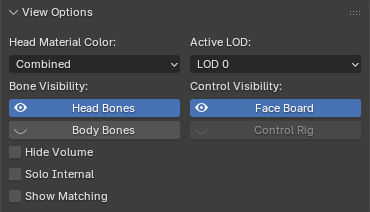
Head Material Color
Preview which map the head material shows:
- Combined — the final shaded result
- Masks — the wrinkle map masks
- Normals — the normal maps
This can be useful when debugging your wrinkle maps.
Active LOD
Switch the visible head mesh between its Levels of Detail (LOD0–LOD7) and the body mesh between its Levels of Detail (LOD0–LOD3).
Bone Visibility
| Toggle | Effect |
|---|---|
| Head Bones | Show/hide the head rig's bones |
| Body Bones | Show/hide the body rig's bones |
| Hide Volume | Hide the non-skinned volume/leaf bones to reduce clutter |
| Solo Internal | Hide surface bones to inspect the internal skeleton only |
| Show Matching | Highlight bones that match the active bone (helpful when trying to identify the same bone in another Rig Instance) |
Control Visibility
| Toggle | Effect |
|---|---|
| Face Board | Show/hide the face board control rig |
| Control Rig | Show/hide the body control rig |