
On a production, you'll often set up an asset in one .blend file and then bring it into another .blend file. For MetaHumans, you need to use the Append or Link operation to do this correctly since there is more than just Blender data involved, and the DNA file relationships need to be reconfigured.
How To
Open File → Import → MetaHuman Append/Link (.blend) and select a .blend file instead of a .dna. You'll see a list of MetaHumans available in that file. Pick one and choose the operation:
- Append — copy the MetaHuman into the current file (independent copy).
- Link — reference the MetaHuman from the source file (updates propagate).
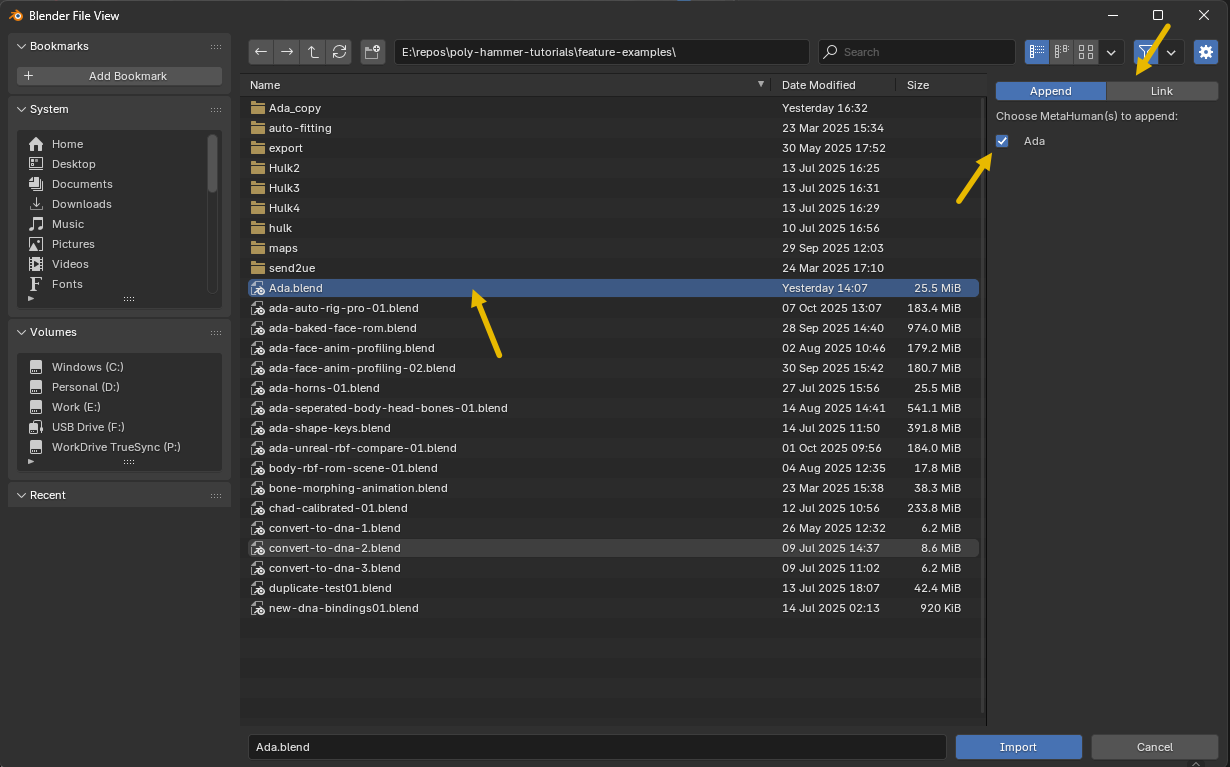
When linking, there is an option Editable Rig that can be turned on. This make's the linked MetaHuman's face board and control rig native to the blender scene, thus allowing you to pose and animated with the rigs while not being able to edit the other data on the MetaHuman objects.
Keep the Collection Names Intact
Warning
Append/Link only works when the MetaHuman keeps the collection names the importer created. Renaming or re-nesting those collections breaks this operator's ability to append or link all data correctly.
If you need to organize your outliner, do it without renaming the MetaHuman's generated collections or moving its rigs out of them. You can change a MetaHuman's name directly on its entry in the Rig Instances panel.